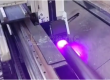
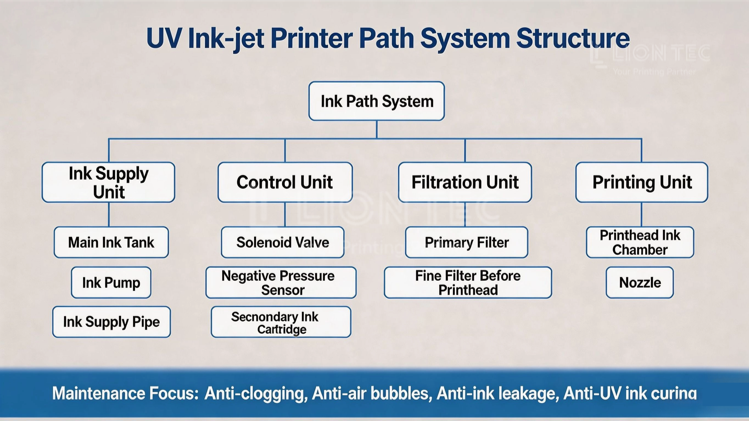
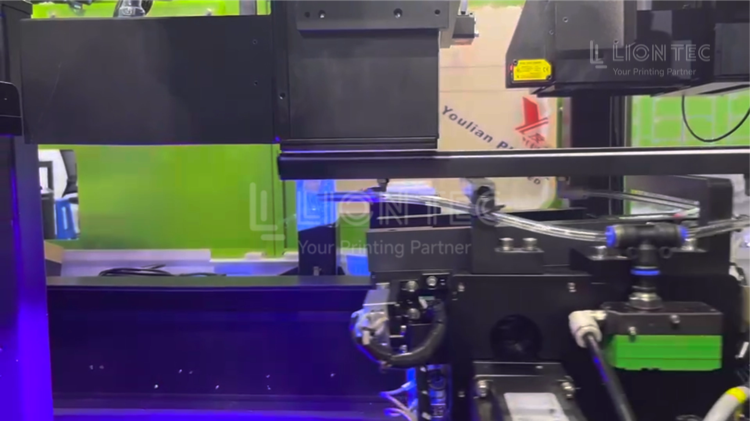
The ink‑path system of industrial inkjet printer is the fluid loop that delivers UV ink for the complete machine, and it also serves as the core fluid component to guarantee stable printing. Simply put, it is a complete transport channel for ink to travel from the ink tank to the printhead assembly.
Ink‑Path System Maintenance Guide
I. Daily Maintenance
- Power‑on Ink‑Path Self‑Check & Air Venting Power on the industrial inkjet printer and wait for the ink‑path negative‑pressure system to start. Verify that the negative‑pressure value on the display falls within the standard range. Activate the ink‑press function to discharge air bubbles accumulated overnight inside pipelines. Print a nozzle test strip and check for continuous, unbroken lines. Confirm normal ink output before starting production.
- Periodic Spitting During Production Perform spitting operation every 2‑4 hours during continuous production to moisten nozzle faces and prevent ink from drying out when exposed to air. If production pauses for more than 15 minutes, make sure to cover the printhead protective hood.
- Ink‑Path Recovery & Cleaning before Shutdown Upon production completion, run ink‑draw‑back to return flowing UV ink inside printhead and short pipelines back to the ink cartridge. Clear waste ink inside the ink‑receiving tray. Wipe residual ink stains at the printhead bottom. Use lint‑free cloth to gently wipe nozzles in one direction; do not rub back‑and‑forth which may scratch nozzle orifices.
- Seal Condition Check at Shutdown Inspect all quick‑connect fittings on ink tubes for ink leakage and ensure pipelines are free from bending or squeezing. Close the printhead protective hood to finish daily maintenance.
II. Weekly Maintenance
- Ink Tank and Secondary Ink Cartridge Inspection Open the ink compartment and check ink status for delamination or sediment. Replace expired ink directly. Never mix UV inks of different brands. Mixed ink of different models tends to react and form solid deposits that block the ink‑path system.
- Pipeline and Seal Performance Inspection Visually inspect along the full ink‑path. Check ink tubes for aging, whitening or cracks. Check sealing rings on each fitting for hardening and ink‑leak traces. Observe whether negative‑pressure value fluctuates abnormally.
- Primary Filter Inspection & Cleaning Check the primary filter at the ink‑tank outlet. Replace filter cartridge promptly if large amounts of impurities gather on the filter mesh. Enable circulation cleaning function and circulate special cleaning fluid through pipelines for short periods to flush ink deposits attached to pipe walls.
- After maintenance, print test strips to re‑check nozzle status and save maintenance records.
III. Monthly Maintenance
- Replace Fine Filter at Printhead Side The precision filter cartridge at printhead inlet acts as the last barrier to block impurities from entering nozzles. Under normal working conditions, monthly replacement is recommended; in high‑dust environments, shorten replacement cycle to 20 days.
- Full Ink‑Path Deep Emptying & Circulation Cleaning Drain residual ink inside ink cartridges. Fill in UV‑specific cleaning fluid to circulate and flush the whole ink‑path system, removing sediment and ink scale adhering to inner pipe walls. Drain waste cleaning fluid after cleaning, refill brand‑new ink and perform air venting again.
- Ink Pump and Solenoid Valve Condition Check Listen for abnormal noise from running ink pumps. Test response sensitivity of solenoid valves. Prepare replacement for aged components in time.
- Keep monthly maintenance log and record filter‑cartridge replacement dates.
Important Notes: When the industrial inkjet printer stays offline for more than 72 hours, the printhead must be sealed for moisture‑preservation protection. Block residual UV light irradiation to avoid ink curing failure.
Conclusion
Routine maintenance for the ink‑path system of the industrial inkjet printer is not an optional “extra task”. Instead, it is an essential investment to guarantee stable operation, extend service life and reduce overall operation‑and‑maintenance costs. Only in this way can the industrial inkjet printer consistently deliver stable, clear and reliable printing quality during long‑term production.